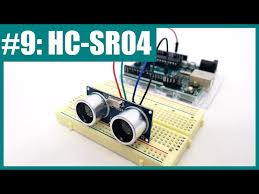
Interfacing Ultrasonic Sensor with Arduino
Learn how to use an HC-SR04 ultrasonic sensor to measure distance with an Arduino.
This sensor is normally used to measure the obstacle and the sensor, It normaly uses trigger and Echo.
Step 1: Gather Components
- Arduino Uno
- Ultrasonic Sensor (HC-SR04)
- Jumper Wires
- Breadboard
- Arduino cable
- Battery or using Laptop
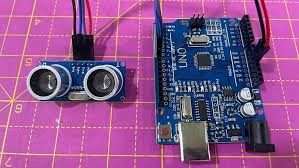
Step 2: Wiring the Sensor
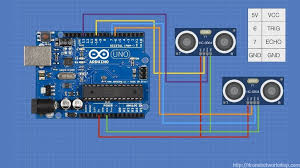
Connect the ultrasonic sensor to the Arduino:
- VCC to Arduino 5V
- GND to Arduino GND
- Trig Pin to Arduino Pin 9
- Echo Pin to Arduino Pin 10
Step 3: Arduino Code
const int trigPin = 9;
const int echoPin = 10;
long duration;
int distance;

void setup() {
  pinMode(trigPin, OUTPUT);
  pinMode(echoPin, INPUT);
  Serial.begin(9600);
}

void loop() {
  digitalWrite(trigPin, LOW);
  delayMicroseconds(2);
  digitalWrite(trigPin, HIGH);
  delayMicroseconds(10);
  digitalWrite(trigPin, LOW);
  duration = pulseIn(echoPin, HIGH);
  distance = duration * 0.034 / 2;
  Serial.print("Distance: ");
  Serial.print(distance);
  Serial.println(" cm");
  delay(1000);
}
Step 4: Upload and Monitor
Upload the code to the Arduino and open the Serial Monitor to see the measured distance.